
What is CPA?
Campaign Performance Assistant is an AI-powered tool that helps MTP teams understand why campaigns perform the way they do by combining campaign performance data with creative assets.
Instead of spending hours reviewing dashboards, CPA transforms data into an interactive conversation, helping teams identify optimization opportunities.
How It Works & How to Use It
CPA integrates directly into the agency workflow to turn raw performance data into an optimized strategy.
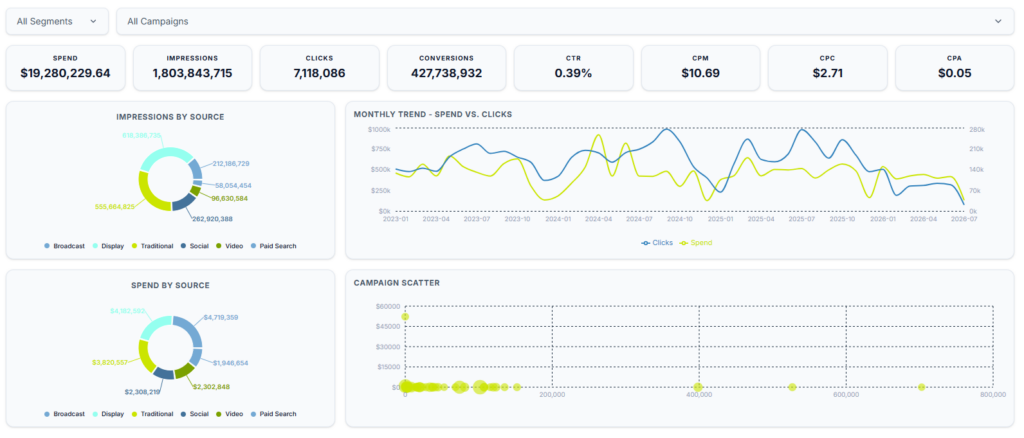
Chat-Style Exploration: Move beyond static dashboards. Use our intuitive AI chat interface to ask natural-language questions about your data, allowing for immediate deep-dives without manual data-pivoting.
Prebuilt Report Templates: Access structured, scannable dashboards designed to immediately highlight top-and-bottom-performing creative variations across different accounts, campaigns, or ad groups.
Creative Metadata Extraction: The tool analyzes your active ads to categorize variables such as text-in-image layout, color palettes, headline copy, CTA style, and visual elements (such as people, products, or lifestyle imagery).
Performance Aggregation: CPA matches these creative attributes against live marketing metrics—including impressions, CPM, clicks, CTR, conversions, conversion rate, CPA, ROAS, and video completion rates.
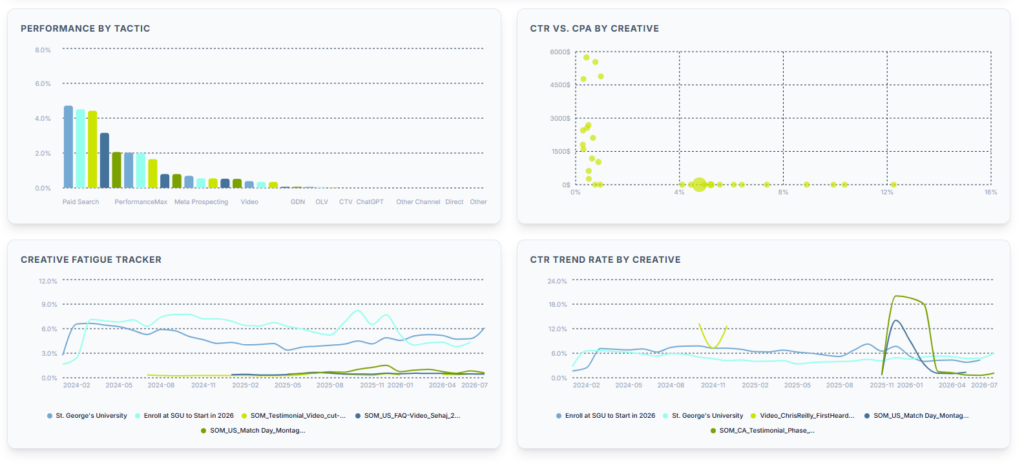
Key Findings and Insights
- Funnel-Stage Alignment: Discover how specific creative elements perform by tactic. For example, identify whether product-focused imagery with clear CTAs yields a lower CPA in retargeting, or if lifestyle video content optimizes CTR during awareness phases.
- Headline & Copy Correlation: Uncover the exact relationship between character lengths, messaging tones, and conversion rates to fine-tune ad group copy.
- Layout and Structural Triggers: Isolate the impact of design choices, such as logo placement or text-in-image balance, on early hook rates and overall engagement rate.
- Audience Response Trends: Pinpoint which visual demographics or lifestyle categories map to higher conversion rates within specific audience segments.
Where CPA Fits Into Your Workflow
Mid-Flight Optimizations
- When media buyers need to make fast tactical adjustments, use CPA to determine exactly which creative variants are driving efficient conversions and which should be paused.
Planning New Tactics
- Before launching a new campaign phase, whether it's upper-funnel prospecting or tight remarketing/lookalike audience targeting, look at historical CPA data to see what structural layouts resonated best with similar cohorts.
Post-Campaign Creative Briefs
- Move away from generic creative feedback. Use CPA post-flight to generate highly specific, data-backed briefs for your design and copy teams, showing them exactly what to build next.
Client Performance Reviews
- Elevate your client conversations. Use CPA during QBRs to give brand marketing teams and CMOs an objective, plain-language breakdown of how their brand identity directly impacted campaign ROI.
When Should I Use CPA?
Campaign Reviews
Understand why campaigns succeeded or underperformed
Creative Optimization
Determine which creative elements impacted performance
Client Reporting
Support client recommendations with insights
Campaign Wrap-Ups
Identify actionable insights that can improve future campaigns
Creative Comparisons
Understand why one creative variation outperformed another
Budget Optimization
Prioritize budget based on performance data
Strategy Development
Turn campaign insights into future media and creative recommendations
Executive Reporting
Summarize campaign performance into clear, actionable insights for the executive team
New Campaign Planning
Use historical insights to inform future campaign strategy pre-launch
Ready To Get Started?
Explore CPA by logging in with your work email via Google OAuth. All MTP employees have access to the demo project right away.
If you do not see your clients’ projects, it means their data has not yet been ingested into CPA — this is a required step before CPA can be used for that client. To get the process started, reach out to the RADaR Analytics team at [email protected].
Latest blog posts about Campaign Performance Assistant
-
We Built a Brain for Your Campaign Data. Meet your Campaign Performance Assistant (CPA).
UPDATE: September 9, 2026 CPA is now available to all MTP employees. Updates and improvements since our initial release include: Campaign Performance Assistant by Meet The People Dark banner with grid background, funnel ring motif on the left, and connected data nodes on the right Campaign Performance Assistant BY MEET THE PEOPLE Your clients’ marketing… -
Campaign Performance Analyst Architecture Update
The Campaign Performance Analyst (CPA) project at RADaR has shifted from standard AWS/Snowflake tools to a custom Python architecture featuring proprietary custom AI agents and Anthropic’s Model Context Protocol (MCP) Server. This overhaul significantly improved flexibility and cut query response times from two minutes to under 20 seconds. -
Campaign Intelligence Technical Architecture Research
As we move into development of our latest tool, Campaign Intelligence, we need to take a look at the high-level architecture and available resources before moving forward. This document serves as a reference for the research we did, the benefits and drawbacks of using specific integrations for our product, and the reasoning behind any decisions…