
What is RA?
Resident Advisor is a workspace for fast, grounded brand analysis — for clients, prospects, and competitors. Choose a brand, ask a question, and get credible insights in seconds.
How It Works & How to Use It
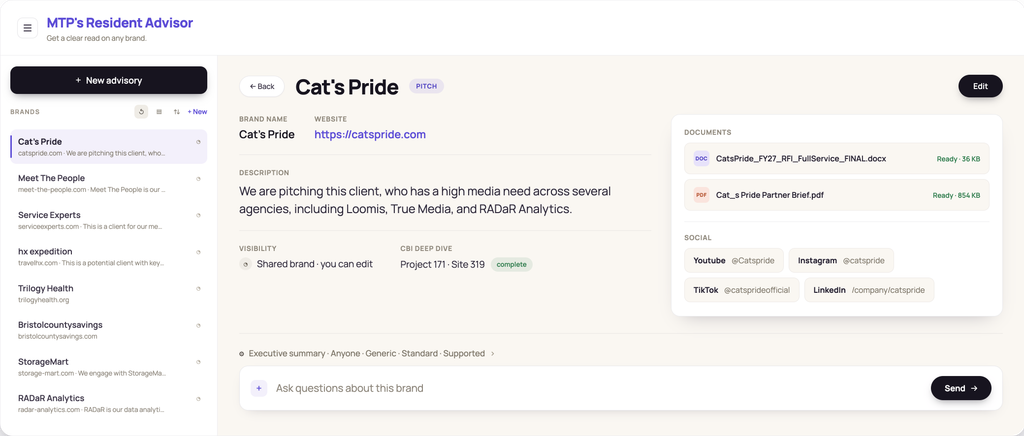
Save a brand: Type in any website URL to create and save a brand. Add notes, upload additional documents, and connect social media links to enrich the brand record, then reuse or revisit the brand in the future instead of starting from zero.
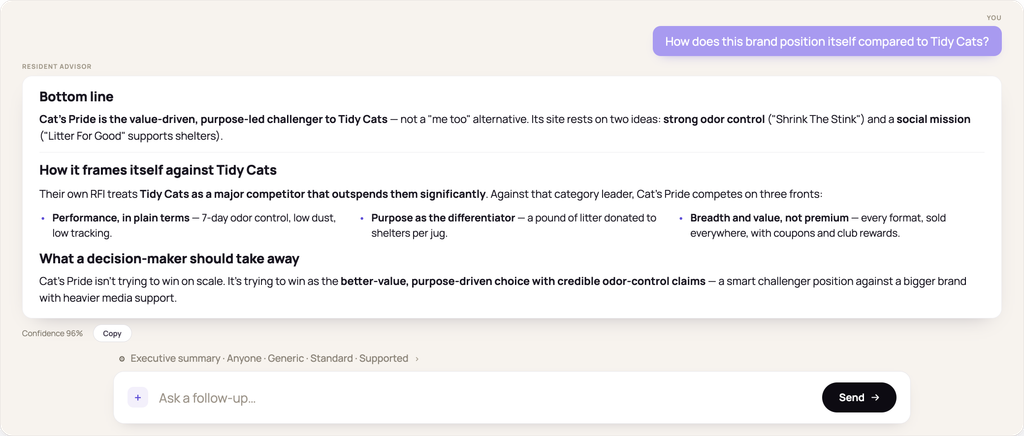
Get insights via chat: Ask focused questions about the brand in plain language — no dashboards or manual digging required. Try something like “What are the three clearest customer benefits on this site?” or “How does this brand talk about itself vs. [competitor]?”
Tailor RA’s responses: Shape each answer before you receive it. Make selections to decide how the information is formatted, which audience it’s intended for, and how tightly claims must be backed.
Key Features
- Rapid Brand Insights: Get an evidence-backed summary of any brand’s digital presence and immediate answers to your follow-up questions.
- Shared Intelligence, Network-Wide: RA’s memory is keyed to the brand’s domain, not to the user themselves. That means for shared brands, insights compound and answers get smarter with every question asked, regardless of who’s asking it.
- Grounded, Not Guessed: Every answer is retrieved from trusted sources: the brand’s website, uploaded documents, connected social accounts, prior chat memory, and linked CBI data. And when data is weak or missing, RA will flag it rather than making inferences.
- Side-by-Side Comparisons: Compare up to four brands at once to see how a client stacks up against competitors.
How Should I Use RA?
Pitch & QBR Prep
Show up to meetings with a clear, accurate picture of a prospect or client brand
Creative Direction Checks
Pressure-test a concept against a brand’s positioning before committing real production time
Fast Research
Skip the manual site-scouring and screenshotting under a deadline
Persona-Driven Answers
Receive answers rooted in a specific decision-maker’s priorities and written in their voice
Brand Voice Checks
Compare what a brand claims versus what its live site and social accounts actually show
Cross-Agency Handoffs
Pass a prospect or client’s research along to another MTP agency so they’re not starting cold
RA vs. Creative Brand Identity (CBI): Which One Should I Use?
Both are brand analysis tools, but they’re built for different moments:
Log into RA when someone asks “what’s this brand actually doing right now?” and you need high-level answers quickly.
Request a CBI report when you need deeper information or a formal deliverable to share with stakeholders.
Use them together: Link a brand’s existing CBI analysis to its RA record (or let Auto-discover find it for you) so RA’s answers can pull on CBI’s scores, tonality, and visual identity work.
Ready To Get Started?
Log in with your work email via Google OAuth. All MTP employees can create brands and start chats right away — there’s no setup or client data ingestion required.
Latest blog posts about Resident Advisor
-
Resident Advisor: A Faster Way to Get Answers and Brand Insights
If you work across Coegi, RADaR, Saltwater, VSA or any team in the MTP network, you already know the drill with Creative Brand Identity: point it at a client or prospect, wait for the deep dive, get back a comprehensive report you can build a strategy on. It’s thorough. It’s also not built for the…